Where can I find my invoices?
You can access the specifics of your Short.io invoices and download the documents in PDF format by following these steps.
-
Sign in to your Short.io account.
-
Expand the Settings menu and click on Invoices:
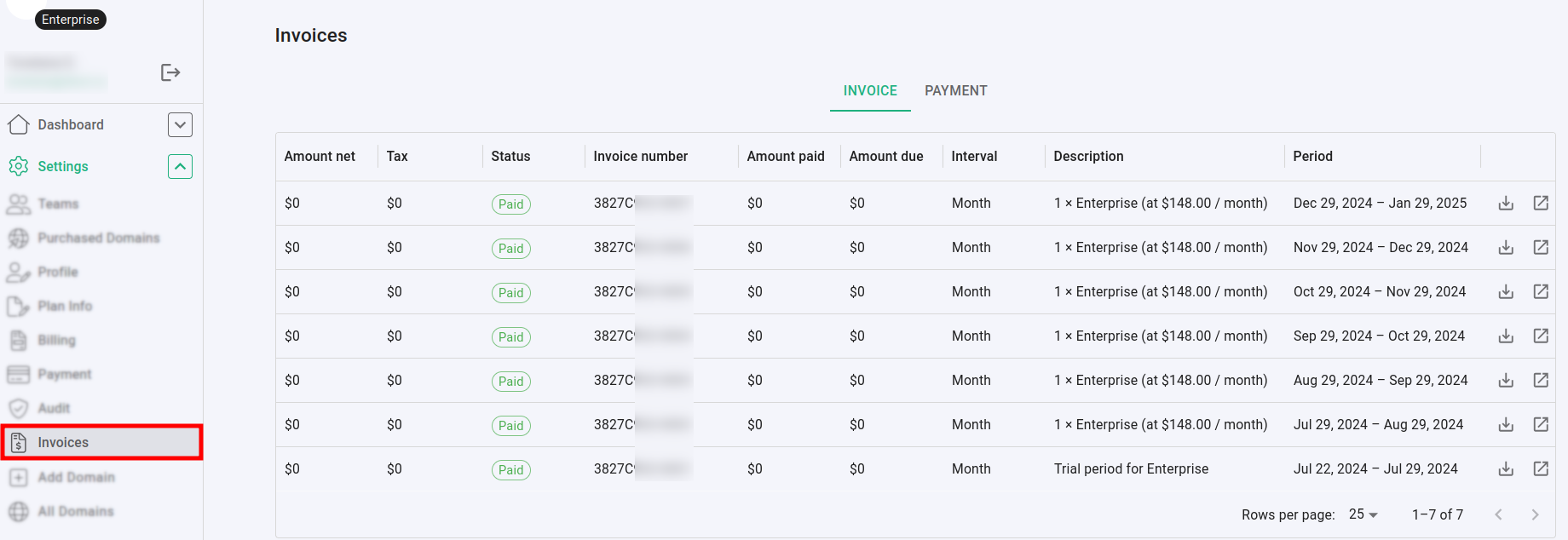
In the Invoice tab the detailed information includes:
-
Amount net - the amount to be paid without the taxes
-
Tax - the taxes (if applied)
-
Status - the current status of the invoice: Paid or due
-
Invoice number - the unique identifier of the invoice
-
Amount paid - the amount which is already paid
-
Amount due - the amount which is still due
-
Interval - the payment interval, for example: Month
-
Description - a description of the invoice, for example: 1 × Enterprise (at $148.00 / month)
-
Period - the time period covered by the invoice, for example: Dec 29, 2024 – Jan 29, 2025
You can download each document in PDF format by clicking on  at the right end of the invoice line:
