Updating an existing short URL's slug
The instructions below demonstrate how to edit a slug (the "path" or the end part of a URL after the backslash "/" that identifies specific page or post) of an existing short URL. This user guide can be used to modify additional parameters (for more information please visit the following page: https://developers.short.io/reference/post_links-linkid).
To update an existing short link
- Create a secret API key from the Integrations and API menu: https://app.short.io/settings/integrations/api-key
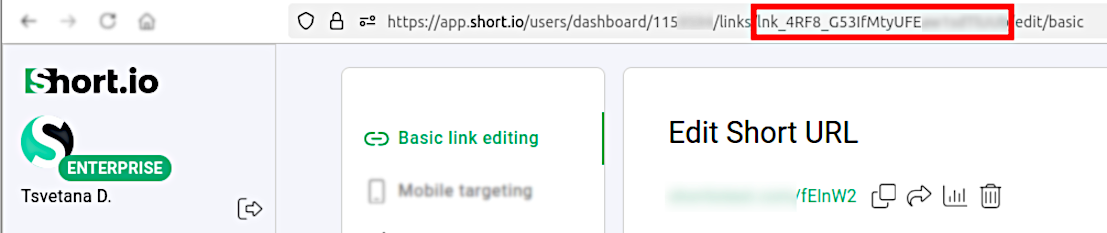
- Get the ID of the short link which you want to edit:
- In the Short.io Dashboard open the link for editing:

- Copy the link ID from your browser's address bar:
- Then you may need to install prerequisites for HTTP requests (if necessary, depending on your programming language and its version).
- With the following code snippet examples you will be able to update a short link's slug:
📘
Please replace {user.path} (the new slug to be applied), {user.apiKey} and {user.link_id} with the appropriate values.
- PHP
- Python
- Node.js
- Java
- C#
<?php

$curl = curl_init();

curl_setopt_array($curl, [
  CURLOPT_URL => "https://api.short.io/links/<<link_id>>",
  CURLOPT_RETURNTRANSFER => true,
  CURLOPT_ENCODING => "",
  CURLOPT_MAXREDIRS => 10,
  CURLOPT_TIMEOUT => 30,
  CURLOPT_HTTP_VERSION => CURL_HTTP_VERSION_1_1,
  CURLOPT_CUSTOMREQUEST => "POST",
  CURLOPT_POSTFIELDS => json_encode([
    'path' => '<<path>>'
  ]),
  CURLOPT_HTTPHEADER => [
    "Authorization: <<apiKey>>",
    "accept: application/json",
    "content-type: application/json"
  ],
]);

$response = curl_exec($curl);
$err = curl_error($curl);

curl_close($curl);

if ($err) {
  echo "cURL Error #:" . $err;
} else {
  echo $response;
}
import requests

url = "https://api.short.io/links/<<link_id>>"

payload = {
    "path": "<<path>>"
}
headers = {
    "accept": "application/json",
    "content-type": "application/json",
    "Authorization": "<<apiKey>>"
}

response = requests.post(url, json=payload, headers=headers)

print(response.text)
import { setApiKey, updateLink } from "@short.io/client-node";

setApiKey("<<apiKey>>");

const result = await updateLink({
  path: { linkId: "<<link_id>>" },
  body: { path: "<<path>>" }
});

console.log(result.data);
HttpRequest request = HttpRequest.newBuilder()
    .uri(URI.create("https://api.short.io/links/<<link_id>>"))
    .header("accept", "application/json")
    .header("content-type", "application/json")
    .header("Authorization", "<<apiKey>>")
    .method("POST", HttpRequest.BodyPublishers.ofString("{\"skipQS\":false,\"archived\":false,\"path\":\"<<path>>\"}"))
    .build();
HttpResponse<String> response = HttpClient.newHttpClient().send(request, HttpResponse.BodyHandlers.ofString());
System.out.println(response.body());
using System.Net.Http.Headers;
var client = new HttpClient();
var request = new HttpRequestMessage
{
    Method = HttpMethod.Post,
    RequestUri = new Uri("https://api.short.io/links/<<link_id>>"),
    Headers =
    {
        { "accept", "application/json" },
        { "Authorization", " <<apiKey>>" },
    },
    Content = new StringContent("{\"skipQS\":false,\"archived\":false,\"path\":\"<<path>>\"}")
    {
        Headers =
        {
            ContentType = new MediaTypeHeaderValue("application/json")
        }
    }
};
using (var response = await client.SendAsync(request))
{
    response.EnsureSuccessStatusCode();
    var body = await response.Content.ReadAsStringAsync();
    Console.WriteLine(body);
}
- Review the JSON response which should resemble the following:
{
  originalURL: '<<long_url>>',
  path: '<<path>>',
  idString: '<<link_id>>',
  id: '<<link_id>>',
  shortURL: 'https://<<domain_name>>/<<path>>',
  secureShortURL: 'https://<<domain_name>>/<<path>>',
  cloaking: false,
  tags: [],
  createdAt: '2025-04-28T13:51:04.721Z',
  skipQS: false,
  archived: false,
  DomainId: <<domain_id>>,
  OwnerId: <<owner_id>>,
  hasPassword: false,
  source: 'api',
  User: {
    id: <<user_id>>,
    name: '<<user_name>>',
    email: '<<user_email>>',
    photoURL: '<<user_photo_id>>'
  }
}
You have successfully renamed a short link through our API:
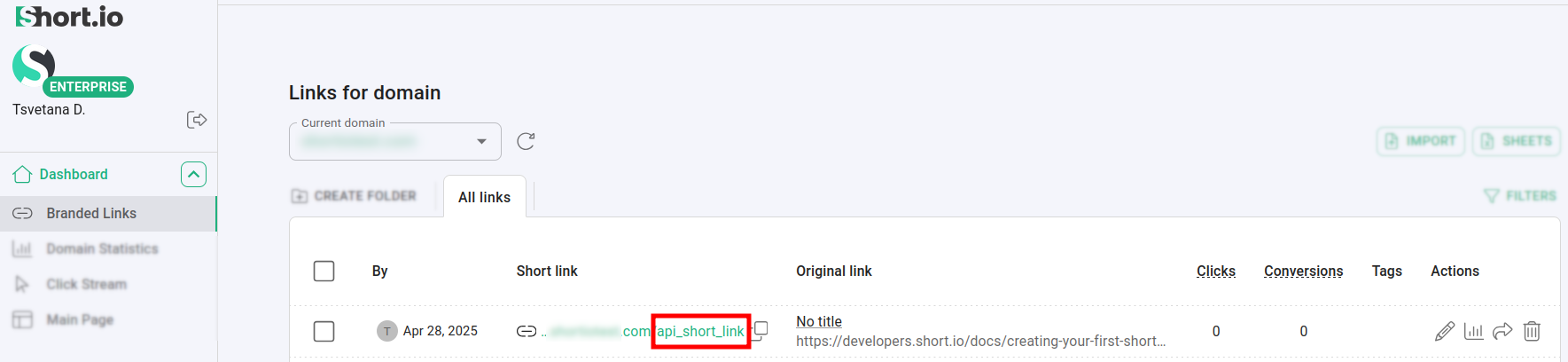
Most important keys in the response are YOUR_PATH (the path or slug of the edited short link) and LINK_ID.
You can find more information on link updating parameters in the following page: https://developers.short.io/reference/post_links-linkid