How to change social media preview (Open Graph metadata) via API
Using the Short.io API features you can change the generated preview data of a link that you share on social networks.
The Social media preview is available starting from the Pro plan.
Before you begin, make sure you have created an API key.
To update social media preview
-
Sign in to your Short.io account.
-
Browse the opengraph properties page.
-
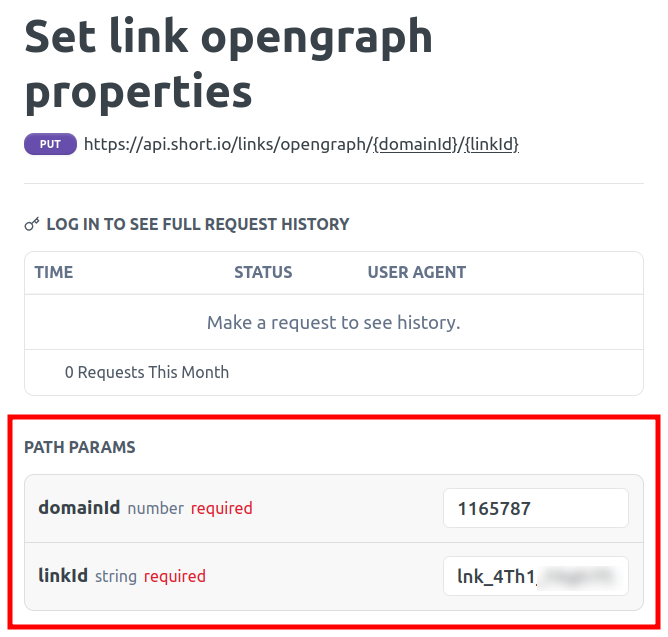
In the Path params section provide the needed data:
-
domainId - the unique identifier of your domain
-
linkId - the unique identifier of your short link
NoteYou can find information on how to retrieve the above parameters in the following article.
-
-
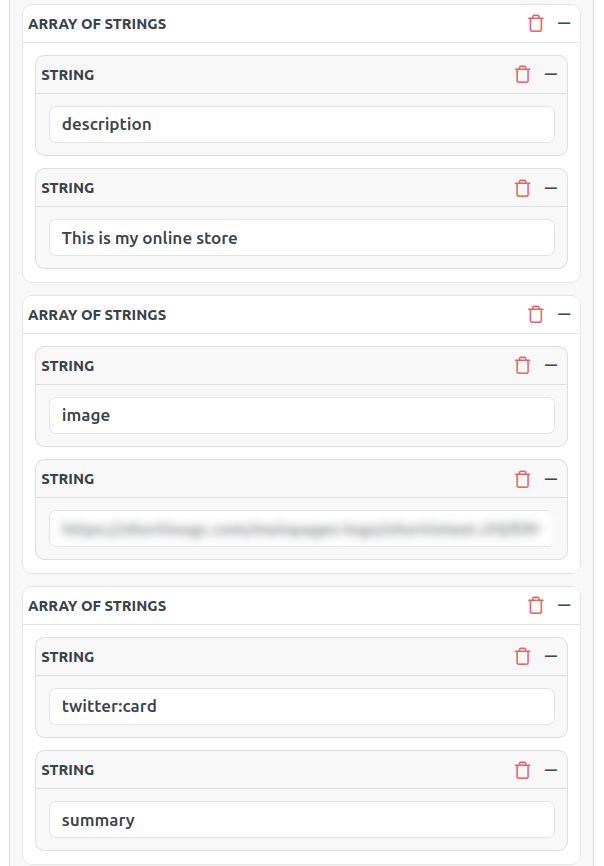
Navigate to the Body params section and click on + to Add array of strings:

-
Enter as much parameters and their values as needed, for example:
-
[ "description", "This is my online store" ]
-
[ "image", "
<your-image-URL>" ] -
[ "twitter:card", "summary" ]
 Note
NoteYou can review the full list of parameters here.
-
-
Navigate to the Credentials section and enter your authorization key:

-
Click on Try it!.
-
In the Response panel you can review the result:

-
Sign in to your Short.io account.
-
From the Branded links menu click on
 to edit the short link which you updated via the API: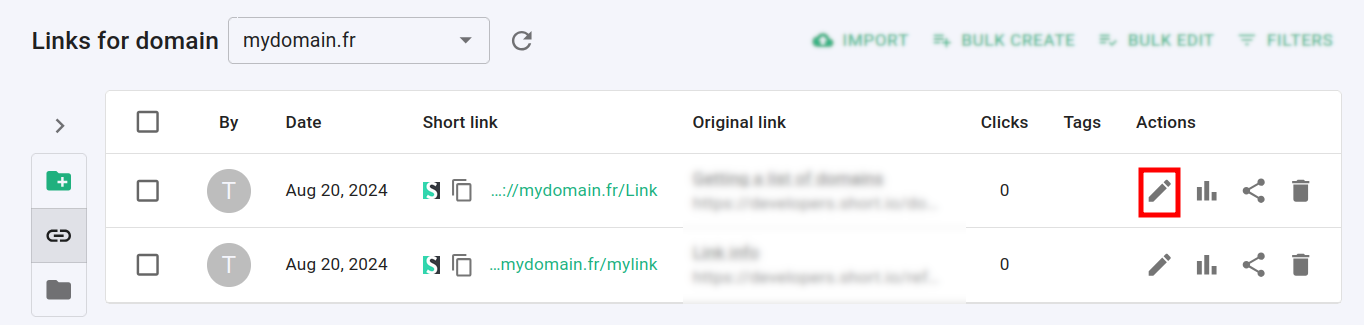
-
Navigate to the Social media menu to review the new values:

You can then use the Facebook's Sharing Debugger to check how the link's preview looks after you added the Open Graph settings.
Full list of parameters, descriptions and expected values
Below is a list in alphabetical order of all the parameters, descriptions and expected values (if applicable) that can be set as social media metadata:
| Parameter | Description / Expected value |
|---|---|
| audio | URL to an audio file |
| description | Page description |
| determiner | A, an or the |
| image:alt | Description of what is in the image |
| image:height | Image height |
| image:width | Image width |
| image:type | Image MIME type |
| image | Image URL |
| locale | Locale of the page |
| locale:alternate | Alternate locals of the page |
| site_name | Website name |
| title | Page title |
| twitter:app:country | X/Twitter app country |
| twitter:app:url:googleplay | Your app URL in Google Play |
| twitter:app:id:googleplay | Your app ID in Google Play |
| twitter:app:name:googleplay | Name of your app in Google Play |
| twitter:app:url:ipad | Your iPad app URL in Apple Store |
| twitter:app:id:ipad | Your iPad app ID in Apple Store |
| twitter:app:name:ipad | Name of your iPad app in Apple Store |
| twitter:app:url:iphone | Your iPhone app URL in Apple Store |
| twitter:app:id:iphone | Your iPhone |
| twitter:app:name:iphone | Name of your iPhone app in Apple Store |
| twitter:player:stream | URL to raw video or audio stream |
| twitter:player:height | Height of iframe in pixels |
| twitter:player:width | Width of iframe in pixels |
| twitter:player | HTTPS URL of player iframe |
| twitter:image:alt | A text description of the image |
| twitter:image | URL of image to use in the card |
| twitter:title | Title of content (max 70 characters) |
| twitter:description | Description of content (max 200 characters) |
| twitter:creator:id | X/Twitter user ID of content creator |
| twitter:creator | @username of content creator |
| twitter:site:id | X/Twitter website ID |
| twitter:site | @username of website |
| twitter:card | The X card type |
| type | Page type: article, book, profile, website, music.song, music.album, music.playlist, music.radio_station, video.movie, video.episode, video.tv_show, video.other |
| url | Canonical URL of your object |