Archiving a short URL
To archive an existing short link
- Create a secret API key from the Integrations and API menu: https://app.short.io/settings/integrations/api-key
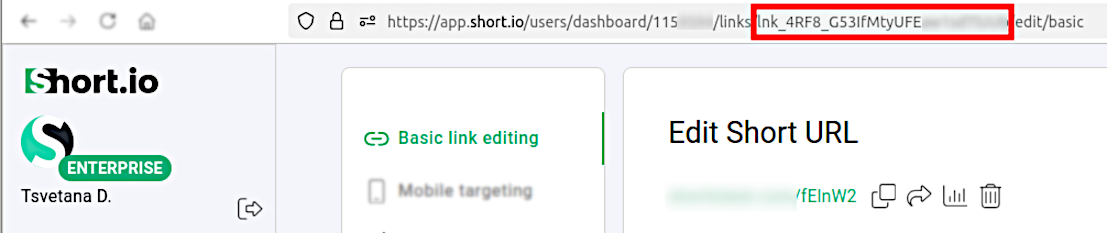
- Get the ID of the short link which you want to archive:
- In the Short.io Dashboard open the link for editing:

- Copy the link ID from your browser's address bar:
- Then you may need to install prerequisites for HTTP requests (if necessary, depending on your programming language and its version).
- Use the following code snippets to archive a short URL:
📘
Please replace {user.link_id} and {user.apiKey} with the appropriate values.
- PHP
- Python
- Node.js
- Java
- C#
$curl = curl_init();

curl_setopt_array($curl, [
  CURLOPT_URL => "https://api.short.io/links/archive",
  CURLOPT_RETURNTRANSFER => true,
  CURLOPT_ENCODING => "",
  CURLOPT_MAXREDIRS => 10,
  CURLOPT_TIMEOUT => 30,
  CURLOPT_HTTP_VERSION => CURL_HTTP_VERSION_1_1,
  CURLOPT_CUSTOMREQUEST => "POST",
  CURLOPT_POSTFIELDS => json_encode([
    'link_id' => '<<link_id>>'
  ]),
  CURLOPT_HTTPHEADER => [
    "Authorization: <<apiKey>>",
    "accept: application/json",
    "content-type: application/json"
  ],
]);

$response = curl_exec($curl);
$err = curl_error($curl);

curl_close($curl);

if ($err) {
  echo "cURL Error #:" . $err;
} else {
  echo $response;
}
import requests

url = "https://api.short.io/links/archive"

payload = { "link_id": "<<link_id>>" }
headers = {
    "accept": "application/json",
    "content-type": "application/json",
    "Authorization": "<<apiKey>>"
}

response = requests.post(url, json=payload, headers=headers)

print(response.text)
import { setApiKey, archiveLink } from "@short.io/client-node";

setApiKey("<<apiKey>>");

const result = await archiveLink({
  body: { link_id: "<<link_id>>" }
});

console.log(result.data);
HttpRequest request = HttpRequest.newBuilder()
    .uri(URI.create("https://api.short.io/links/archive"))
    .header("accept", "application/json")
    .header("content-type", "application/json")
    .header("Authorization", "<<apiKey>>")
    .method("POST", HttpRequest.BodyPublishers.ofString("{\"link_id\":\"<<link_id>>\"}"))
    .build();
HttpResponse<String> response = HttpClient.newHttpClient().send(request, HttpResponse.BodyHandlers.ofString());
System.out.println(response.body());
using System.Net.Http.Headers;
var client = new HttpClient();
var request = new HttpRequestMessage
{
    Method = HttpMethod.Post,
    RequestUri = new Uri("https://api.short.io/links/archive"),
    Headers =
    {
        { "accept", "application/json" },
        { "Authorization", "<<apiKey>>" },
    },
    Content = new StringContent("{\"link_id\":\"<<link_id>>\"}")
    {
        Headers =
        {
            ContentType = new MediaTypeHeaderValue("application/json")
        }
    }
};
using (var response = await client.SendAsync(request))
{
    response.EnsureSuccessStatusCode();
    var body = await response.Content.ReadAsStringAsync();
    Console.WriteLine(body);
}
- The JSON response should be "success": true:
{
  "success":true
}
You have successfully archived a short link through our API.
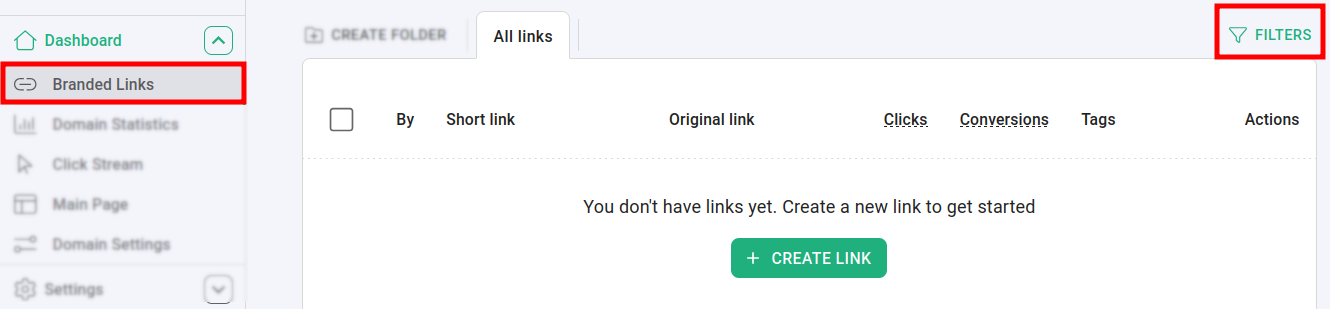
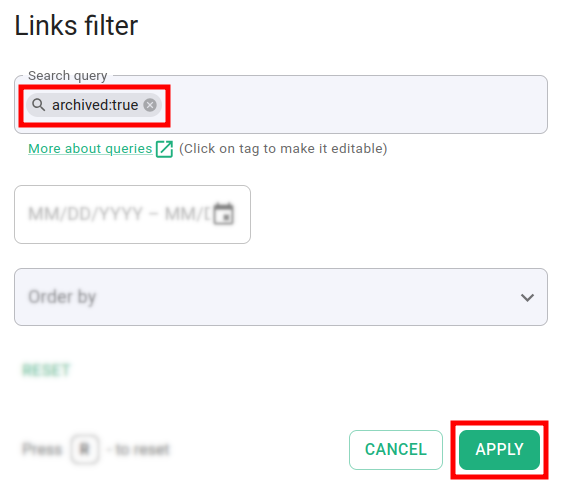
The link is no longer visible from the Branded links panel. You can find it by using the filters and setting the Search query to archived:true :
And if you wish to archive several short links at the same time, please refer to the following webpage for more information: https://developers.short.io/reference/post_links-archive-bulk