Link Statistics
📘 Information below might be outdated - please visit our recently updated API Reference
The instruction below shows how to get detailed statistics for a link.
1) Get your API key here: https://app.short.io/settings/integrations/api-key
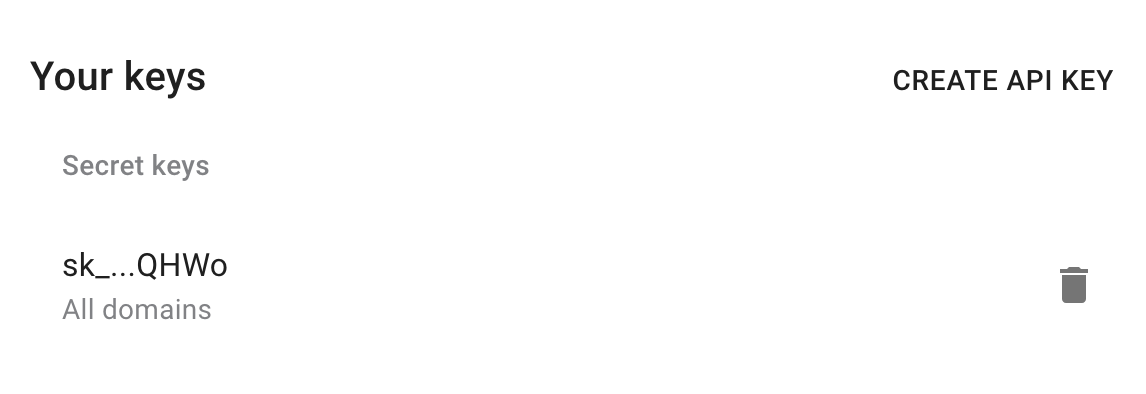
- Click "Create API key".
- Add a Secret key.
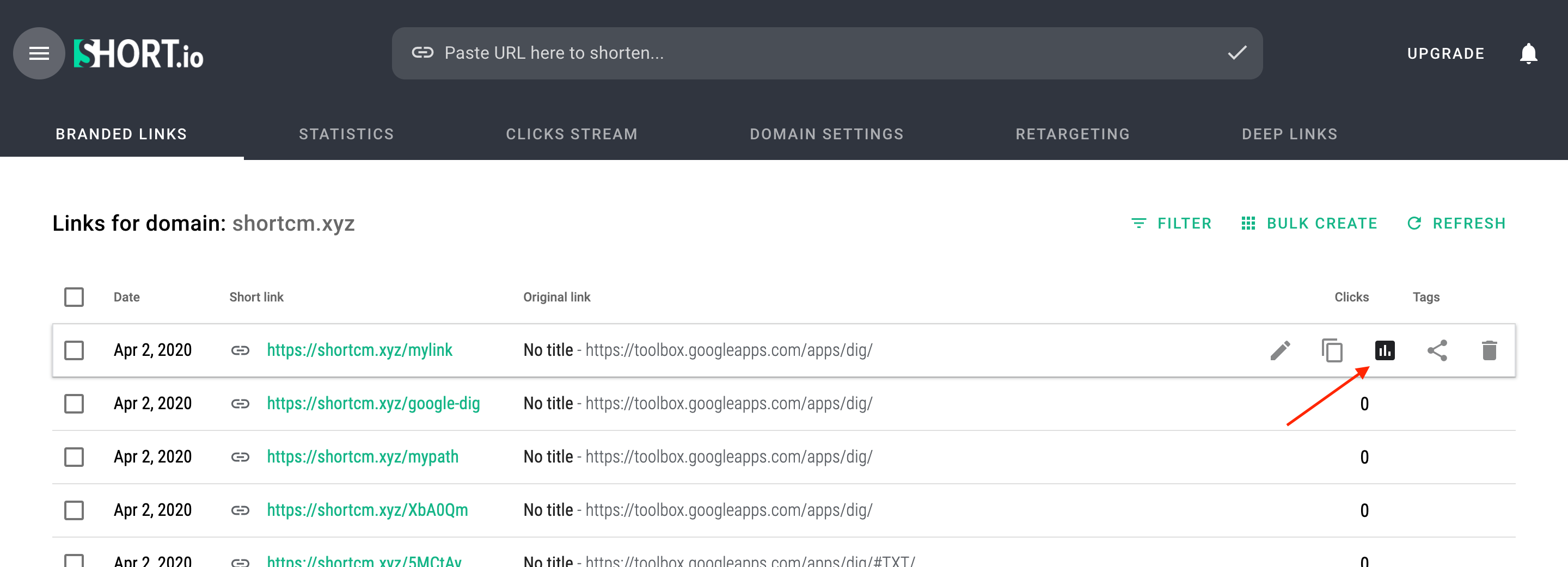
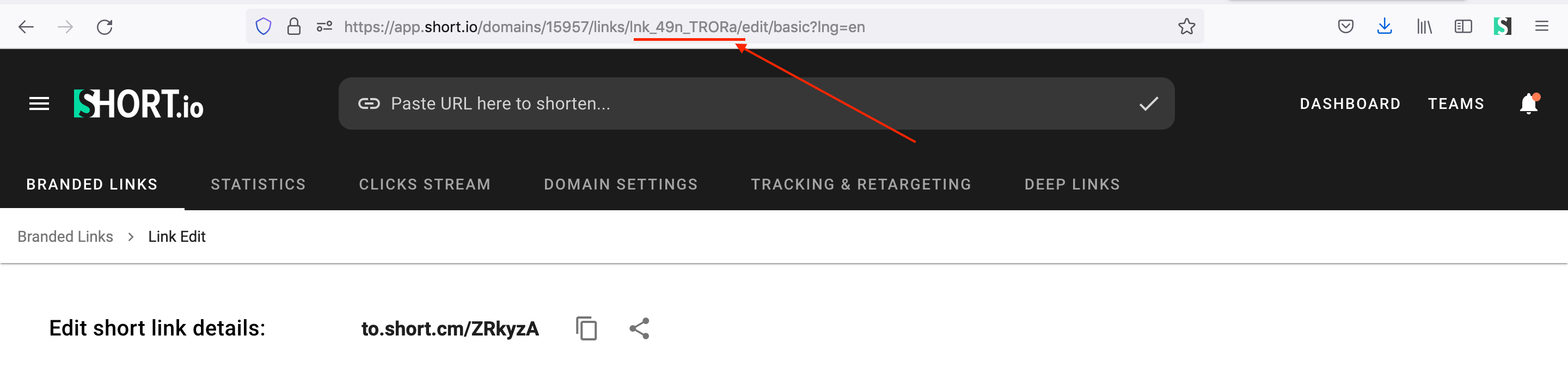
2) Copy an ID of a short link you want to get detailed statistics.
- Open the statistics of the short link.
- Copy the link ID.
3) Install prerequisites for requests.
- Python
- Node.js
pip install requests
// No additional dependencies required (uses native fetch)
Now everything is ready to run the following snippet. It will send detailed statistics of a short URL.
4) Create a file: filename.py/ .js/ .rb. Use the code snippet below.
📘
Please, replace LINK_ID and Period with appropriate values.
👍
Available periods for statistics: today, yesterday, total, week, month, lastmonth, last7, last30 and custom.
- Python
- Node.js
- Ruby
import requests

url = "https://api-v2.short.io/statistics/link/linkID"

querystring = {"period":"total","tzOffset":"0"}

headers = {
    'accept': "*/*",
    'authorization': "<<apiKey>>"
    }

response = requests.request("GET", url, headers=headers, params=querystring)

print(response.text)
const url = "https://api-v2.short.io/statistics/link/linkID?period=total&tzOffset=0";
const options = {
  method: "GET",
  headers: {
    accept: "*/*",
    authorization: "<<apiKey>>"
  }
};

const response = await fetch(url, options);
const data = await response.json();
console.log(data);
require 'uri'
require 'net/http'
require 'openssl'

url = URI("https://api-v2.short.io/statistics/link/linkID?period=total&tzOffset=0")

http = Net::HTTP.new(url.host, url.port)
http.use_ssl = true
http.verify_mode = OpenSSL::SSL::VERIFY_NONE

request = Net::HTTP::Get.new(url)
request["accept"] = '*/*'
request["authorization"] = '<<apiKey>>'

response = http.request(request)
puts response.read_body
5) Launch the file.
- Python
- Node.js
- Ruby
python filename.py
node filename.js
ruby filename.rb
6) JSON Response.
Once you run the code, you will see the response.
{
  totalClicks: 42,
  humanClicks: 8,
  humanClicksChange: '0',
  totalClicksChange: '0',
  clickStatistics: { datasets: [ [Object] ] },
  interval: {
    startDate: null,
    endDate: null,
    prevStartDate: null,
    prevEndDate: null
  },
  referer: [],
  social: [],
  browser: [
    { score: 6, browser: 'Chrome' },
    { score: 1, browser: 'Safari' },
    { score: 1, browser: 'Firefox' }
  ],
  country: [
    { score: 4, country: 'US', countryName: 'United States' },
    { score: 3, country: 'FR', countryName: 'France' },
    { score: 1, country: 'DE', countryName: 'Germany' }
  ],
  city: [
    { score: 2, city: '4744870', name: 'Ashburn' },
    { score: 2, city: '5714964', name: 'Boardman' },
    { score: 1, city: '2921232', name: 'Gera' }
  ],
  os: [ { score: 5, os: 'Windows' }, { score: 3, os: 'Mac OS X' } ]
}
7) How to request statistics for a custom period
🚧
startDate and endDate parameters require date format in milliseconds from epoch.
Here you can convert your date: https://www.epochconverter.com/
pip install arrow
- Python
- Node.js
- Ruby
import requests
import arrow

url = "https://api-v2.short.cm/statistics/link/linkID"

querystring = {"period":"custom","tzOffset":"0","startDate": arrow.get('2020-05-01T21:23:58.970460+07:00').timestamp * 1000,"endDate": arrow.get('2020-05-04T21:23:58.970460+07:00').timestamp * 1000}

headers = {
    'accept': "*/*",
    'authorization': "<<apiKey>>"
    }

response = requests.request("GET", url, headers=headers, params=querystring)

print(response.text)
const startDate = new Date("2020-04-30T15:56:53").valueOf();
const endDate = new Date("2020-05-05T15:56:53").valueOf();
const url = `https://api-v2.short.cm/statistics/link/linkID?period=custom&tzOffset=0&startDate=${startDate}&endDate=${endDate}`;
const options = {
  method: "GET",
  headers: {
    accept: "*/*",
    authorization: "<<apiKey>>"
  }
};

const response = await fetch(url, options);
const data = await response.json();
console.log(data);
require 'uri'
require 'net/http'
require 'openssl'

url = URI("https://api-v2.short.cm/statistics/link/linkID?period=total&tzOffset=0&startDate=1588231150000&endDate=1588663150000")

http = Net::HTTP.new(url.host, url.port)
http.use_ssl = true
http.verify_mode = OpenSSL::SSL::VERIFY_NONE

request = Net::HTTP::Get.new(url)
request["accept"] = '*/*'
request["authorization"] = '<<apiKey>>'

response = http.request(request)
puts response.read_body
{
  totalClicks: 21,
  humanClicks: 7,
  humanClicksChange: '0',
  totalClicksChange: '0',
  clickStatistics: { datasets: [ [Object] ] },
  interval: {
    startDate: '2020-04-30T12:56:53.000Z',
    endDate: '2020-05-05T12:56:53.000Z',
    prevStartDate: null,
    prevEndDate: null
  },
  referer: [ { score: 1, referer: 't.co' } ],
  browser: [
    { score: 4, browser: 'Chrome' },
    { score: 1, browser: 'Mobile Safari' }
  ],
  country: [
    { score: 6, country: 'US', countryName: 'United States' },
    { score: 1, country: 'DE', countryName: 'Germany' }
  ],
  city: [
    { score: 2, city: '4744870', name: 'Ashburn' },
    { score: 1, city: '4509177', name: 'Columbus' },
    { score: 1, city: '5714964', name: 'Boardman' }
  ],
  os: [
    { score: 3, os: 'Windows' },
    { score: 2, os: 'Mac OS X' },
    { score: 1, os: 'iOS' },
    { score: 1, os: 'Linux' }
  ]
}