How to activate a free short.gy subdomain
If you create a free short.gy subdomain and you have not previously added a phone number in your profile settings, the subdomain will not be activated immediately.
An inactive subdomain will still allow you to create short links; however, these links will not be accessible.
To activate the short.gy subdomain
-
Sign in to your Short.io account.
-
From the Branded links menu select the short.gy subdomain to be activated:

-
After the message To activate the domain we need to verify your phone number appears, click on Activate:

-
You are redirected to the Profile->User information->Basic details page.
Click on
 next to Phone number not set: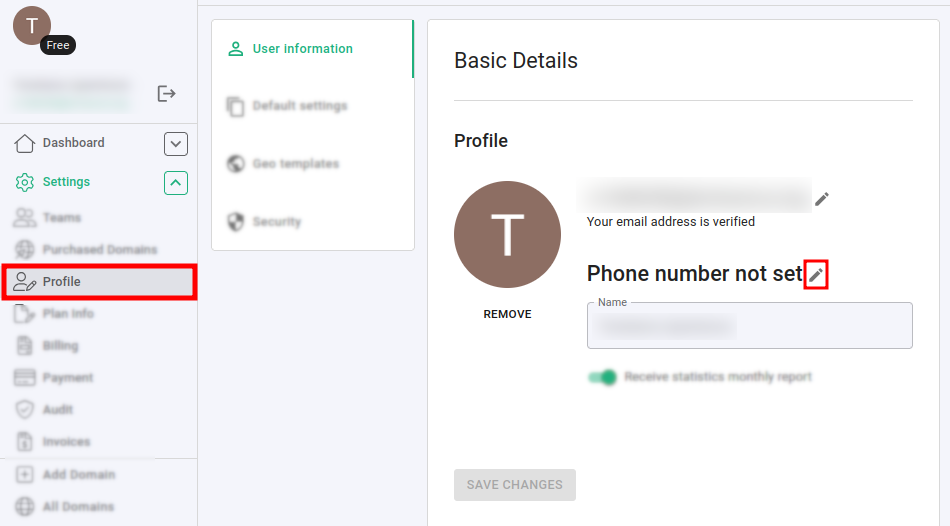
-
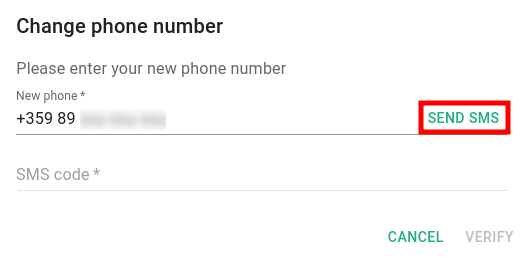
In the next dialog enter your country code and phone number, and click on Send SMS:
-
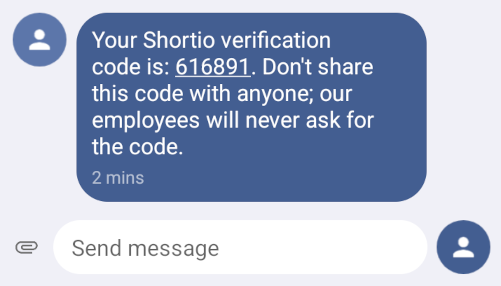
You will receive an SMS with a verification code which expires after 10 minutes:
-
Enter this code in the respective field and click on Verify:
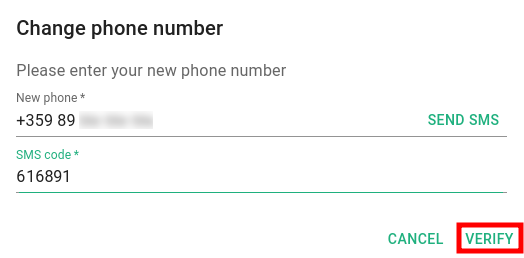
The phone number is verified and set.
You can now navigate to Branded links->your short.gy subdomain to shorten links and enjoy Short.io.