Markdown posts features guide
This article demonstrates the Markdown features supported by the Short.io post renderer and gives copyable examples of how to write them.
It covers standard formatting such as headings, bold/italic/strikethrough, links, images, quotes, lists, task lists, code blocks, and tables. We have also included richer features: LaTeX-style mathematical formulas, Mermaid diagrams (flowcharts, sequence diagrams, ER diagrams, Gantt charts, mind maps, etc.), footnotes, and escaping special characters.
You can find a comprehensive guide on managing posts in the following article: How to manage posts on Short.io
Standard Markdown formatting
1. Headings
| Markdown syntax | Displayed in Short.io posts as |
|---|---|
| # Heading level 1 | Heading level 1 |
| ## Heading level 2 | Heading level 2 |
| ### Heading level 3 | Heading level 3 |
| #### Heading level 4 | Heading level 4 |
| ##### Heading level 5 | Heading level 5 |
| ###### Heading level 6 | Heading level 6 |
You can also use:
Alternative level-one heading
=============================
to display
Alternative level-one heading
as well as
Alternative level-two heading
-----------------------------
for
Alternative level-two heading
2. Text
| Markdown syntax or inline HTML | Displayed in Short.io posts as |
|---|---|
| *italic* | italic |
| _also italic_ | also italic |
| **bold** | bold |
| __also bold__ | also bold |
| <u>underlining</u> | underlining |
| <mark>highlighting</mark> | highlighting |
| Subscript: H<sub>2</sub>O | Subscript: H2O |
| Superscript: x<sup>2</sup> | Superscript: x2 |
| <small>Small print</small> | Small print |
Use inline code (`inline code`) to write commands, identifiers, and short literal values.
Unicode and emoji work too: ✓ → ∞ 🚀.
3. Paragraphs
This is a normal paragraph. A blank line starts a new paragraph.
This line ends with two spaces.
Therefore, this text begins on a new line without starting a new paragraph.
4. Links, references and images
Inline and automatic links
| Markdown syntax | Displayed in Short.io posts as |
|---|---|
| https://short.io/ | https://short.io/ |
| [Short.io website](https://short.io/ "This is a tooltip") | Short.io website |
| info@example.com | [email protected] |
| A relative link: [This user guide](/docs/thisguide.md) | A relative link: This user guide |
| A page fragment: [jump to Headings](#1-headings) | A page fragment: jump to Headings |
Reference-style links
You can add them as follows:
-
Define your mark
[commonmark]: https://blog.short.io/posts-write-and-publish-pages/ "Write and publish pages with Posts" -
Use it
-
Markdown syntax:
Read the [blog post about our new feature][commonmark] or visit the [same reference][commonmark]. -
will be displayed as:
Read the blog post about our new feature or visit the same reference.
-
Images
-
An image with a tooltip
 -
Reference-style image
-
add an image mark
[demo-image]: https://placehold.co/320x120/png?text=Reference+Image "Reference image title" -
use it
![Alternative placeholder][demo-image]
-
-
Image as a link
[](https://short.io)
5. Quotes and alerts
Quotes
Markdown syntax
> This is a blockquote.
>
> It may contain multiple paragraphs, **formatting**, and lists:
>
> 1. First quoted item
> 2. Second quoted item
>
> > Blockquotes can be nested.
is displayed as
This is a blockquote.
It may contain multiple paragraphs, formatting, and lists:
First quoted item
Second quoted item
Blockquotes can be nested.
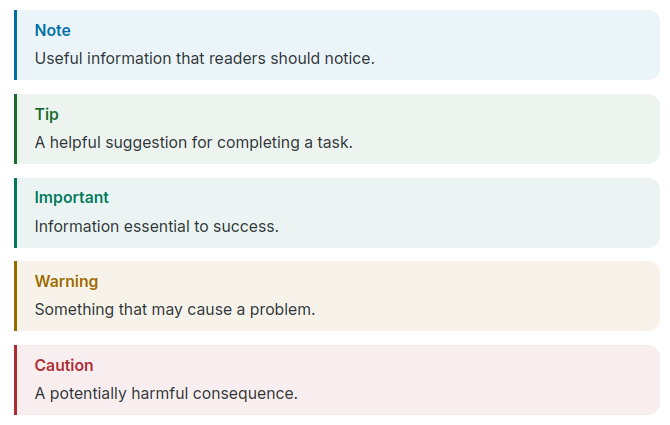
GitHub-style alerts
Markdown syntax
> [!NOTE]
> Useful information that readers should notice.

> [!TIP]
> A helpful suggestion for completing a task.

> [!IMPORTANT]
> Information essential to success.

> [!WARNING]
> Something that may cause a problem.

> [!CAUTION]
> A potentially harmful consequence.
is displayed as
6. Lists and tasks
Unordered lists
Markdown syntax
- First item
- Second item
  - Nested item
  - Another nested item
    1. Ordered child
    2. Another ordered child
- Third item

The `*` and `+` markers can also create unordered lists.
is displayed as
- First item
- Second item
- Nested item
- Another nested item
- Ordered child
- Another ordered child
- Third item
Ordered lists
Markdown syntax
1. First step
2. Second step
   1. Nested step
   2. Another nested step
3. Third step

Starting from another number:

5. Item five
6. Item six
is displayed as
- First step
- Second step
- Nested step
- Another nested step
- Third step
Starting from another number:
- Item five
- Item six
Task list (GitHub-flavored Markdown)
Markdown syntax
- [x] Write the example
- [x] Add formulas
- [x] Add diagrams
- [ ] Customize it for your project
is displayed as
- Write the example
- Add formulas
- Add diagrams
- Customize it for your project
Rich list items
Markdown syntax
1.  A list item can contain several paragraphs.

    Indent the continuation to keep it inside the item.

2.  It can also contain code:
     ```
     indented content inside a list item
     ```
is displayed as
-
A list item can contain several paragraphs.
Indent the continuation to keep it inside the item.
-
It can also contain code:
indented content inside a list item
7. Code
Inline code and escaped backticks
Call `console.log("Hello")`.
To show a backtick inside code, use a longer delimiter: ``const marker = `;``.
Call console.log("Hello").
To show a backtick inside code, use a longer delimiter: const marker = `;.
Fenced code blocks with syntax highlighting
JavaScript
Markdown:
```javascript
/** Return a greeting for the supplied name. */
function greet(name = "world") {
  return `Hello, ${name}!`;
}
console.log(greet("Markdown"));
```
Result:
/** Return a greeting for the supplied name. */
function greet(name = "world") {
  return `Hello, ${name}!`;
}
console.log(greet("Markdown"));
Python
Markdown:
```python
from dataclasses import dataclass

@dataclass
class Point:
    x: float
    y: float

    def magnitude(self) -> float:
        return (self.x**2 + self.y**2) ** 0.5

print(Point(3, 4).magnitude())  # 5.0
```
Result:
from dataclasses import dataclass

@dataclass
class Point:
    x: float
    y: float

    def magnitude(self) -> float:
        return (self.x**2 + self.y**2) ** 0.5

print(Point(3, 4).magnitude())  # 5.0
JSON
Markdown:
```json
{
  "name": "markdown-showcase",
  "features": ["code", "math", "mermaid"],
  "complete": true
}
```
Result:
{
  "name": "markdown-showcase",
  "features": ["code", "math", "mermaid"],
  "complete": true
}
SQL
Markdown:
```sql
SELECT category, COUNT(*) AS item_count
FROM products
GROUP BY category
ORDER BY item_count DESC;
```
Result:
SELECT category, COUNT(*) AS item_count
FROM products
GROUP BY category
ORDER BY item_count DESC;
Code without highlighting
Markdown:
```
This is a plain fenced code block.
Markdown characters such as **bold** are not rendered here.
```
Result:
This is a plain fenced code block.
Markdown characters such as **bold** are not rendered here.
Diff
Markdown:
```diff
- const greeting = "Hi";
+ const greeting = "Hello";
```
Result:
- const greeting = "Hi";
+ const greeting = "Hello";
8. Tables
Alignment and inline formatting
Markdown:
| Left aligned | Center aligned | Right aligned |
| :----------- | :------------: | ------------: |
| Plain text   | **Bold**       |          1.25 |
| `code`       | [Link to Short.io](https://short.io) | 42 |
| Escaped pipe `\|` | ~~Old~~ *New* | 1,024678432901 |
Result:
| Left aligned | Center aligned | Right aligned |
|---|---|---|
| Plain text | Bold | 1.25 |
code | Link to Short.io | 42 |
Escaped pipe | | 1,024678432901 |
Compact table
Markdown:
Feature | Syntax | Typical support
--- | --- | ---
Bold | `**text**` | CommonMark
Task list | `- [x] done` | GFM
Formula | `$E=mc^2$` | Extension
Mermaid | fenced `mermaid` block | Extension
Result:
| Feature | Syntax | Typical support |
|---|---|---|
| Bold | **text** | CommonMark |
| Task list | - [x] done | GitHub-flavored Markdown |
| Formula | $E=mc^2$ | Extension |
| Mermaid | fenced mermaid block | Extension |
Markdown tables do not natively support row spans or column spans. Use an HTML table when those features are necessary and raw HTML is allowed.
Advanced formatting
1. Formulas
Math notation commonly uses LaTeX syntax through a renderer extension.
Inline math
Markdown syntax
Einstein's mass-energy relation is $E = mc^2$, and the circle area is
$A = \pi r^2$.
renders to
Einstein's mass-energy relation is E = mc2, and the circle area is A = πr2.
Display math
$$
\sum_{i=1}^{n} i = \frac{n(n+1)}{2}
$$

The quadratic formula:
$$
x = \frac{-b \pm \sqrt{b^2 - 4ac}}{2a}
$$

A definite integral:
$$
\int_{-\infty}^{\infty} e^{-x^2}\,dx = \sqrt{\pi}
$$

A matrix:
$$
A =
\begin{bmatrix}
1 & 2 \\
3 & 4
\end{bmatrix},
\qquad
\det(A) = -2
$$

A piecewise function:
$$
f(x) =
\begin{cases}
x^2, & x \ge 0, \\
-x,  & x < 0.
\end{cases}
$$

An aligned derivation:
$$
\begin{aligned}
(a+b)^2 &= (a+b)(a+b) \\
        &= a^2 + 2ab + b^2
\end{aligned}
$$

2. Mermaid diagrams
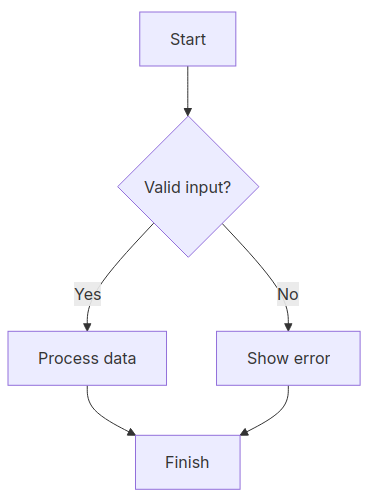
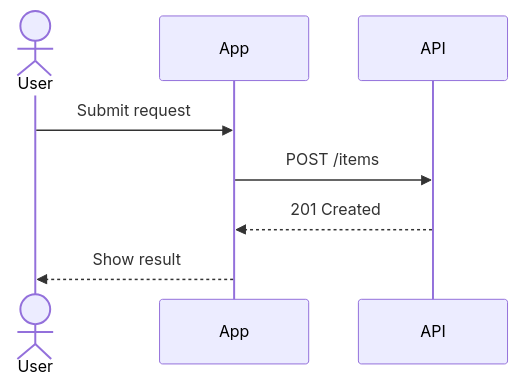
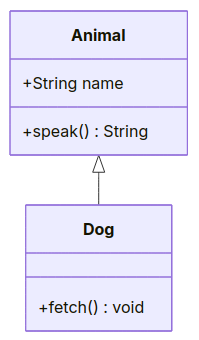
Mermaid diagrams are written in fenced code blocks tagged mermaid.
Flowchart
```mermaid
flowchart TD
    A[Start] --> B{Valid input?}
    B -- Yes --> C[Process data]
    B -- No --> D[Show error]
    C --> E[Finish]
    D --> E
```
Sequence diagram
```mermaid
sequenceDiagram
    actor User
    participant App
    participant API
    User->>App: Submit request
    App->>API: POST /items
    API-->>App: 201 Created
    App-->>User: Show result
```
Class diagram
```mermaid
classDiagram
    class Animal {
        +String name
        +speak() String
    }
    class Dog {
        +fetch() void
    }
    Animal <|-- Dog
```
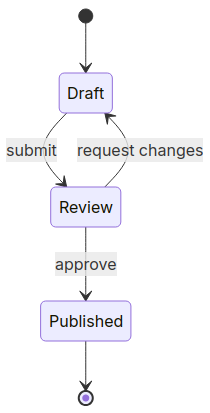
State diagram
```mermaid
stateDiagram-v2
    [*] --> Draft
    Draft --> Review: submit
    Review --> Draft: request changes
    Review --> Published: approve
    Published --> [*]
```
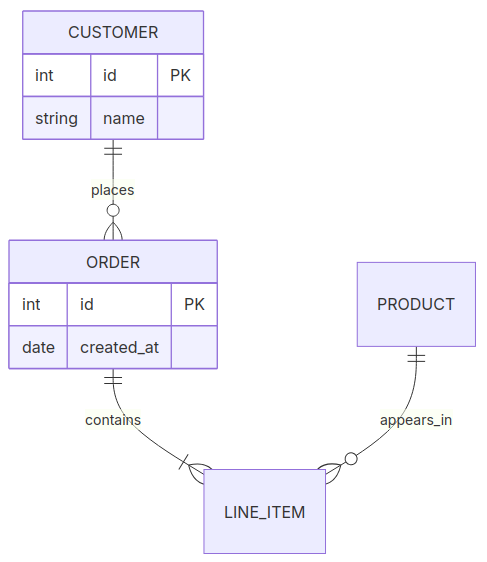
Entity-relationship diagram
```mermaid
erDiagram
    CUSTOMER ||--o{ ORDER : places
    ORDER ||--|{ LINE_ITEM : contains
    PRODUCT ||--o{ LINE_ITEM : appears_in
    CUSTOMER {
        int id PK
        string name
    }
    ORDER {
        int id PK
        date created_at
    }
```
Gantt chart
```mermaid
gantt
    title Example project
    dateFormat YYYY-MM-DD
    section Build
    Design      :done, design, 2026-08-18, 3d
    Implement   :active, build, after design, 5d
    Test        :test, after build, 2d
```

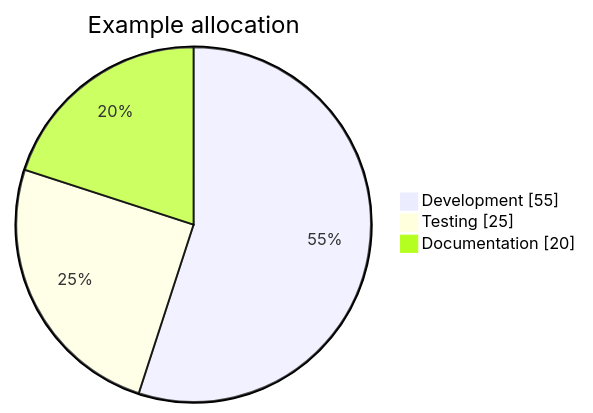
Pie chart
```mermaid
pie showData
    title Example allocation
    "Development" : 55
    "Testing" : 25
    "Documentation" : 20
```
Git graph
```mermaid
gitGraph
    commit id: "Initial"
    branch feature
    checkout feature
    commit id: "Add feature"
    checkout main
    merge feature
    commit id: "Release"
```

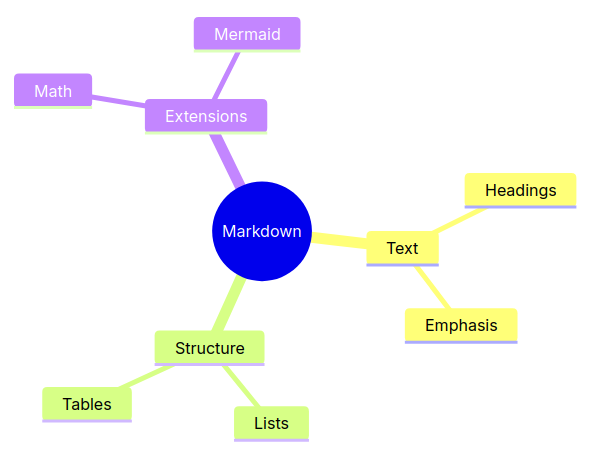
Mind map
```mermaid
mindmap
  root((Markdown))
    Text
      Headings
      Emphasis
    Structure
      Lists
      Tables
    Extensions
      Math
      Mermaid
```
3. Footnotes
Markdown:
Here is a statement with a footnote.[^first] A named footnote may be reused.[^note]


[^first]: This is the first footnote.
[^note]: Footnotes may contain **formatting**, links, and multiple sentences.

    Indented paragraphs can continue the same footnote in compatible renderers.
4. Escaping and special characters
Use a backslash \ to display punctuation that would otherwise have Markdown meaning:
Markdown:
\*not italic\*
\# not a heading
\[not a link\]\(https://example.com\)
1\. not an ordered-list item
Result:
*not italic*
# not a heading
[not a link](https://example.com)
1. not an ordered-list item
Common HTML entities include © → ©, & → &, and
< → <.
To display Markdown syntax without rendering it, place it in inline code or a fenced code block:
````markdown
```python
print("Nested fences use a longer outer fence")
```
````
Related article: